A simpler Canva alternative for carousels
LightFit vs Canva, honestly: what each does better, what it costs, and who should switch.
If you mainly make carousels, a carousel-only tool is the simpler Canva alternative. LightFit Studios starts every post finished, in your name, so there's nothing to line up by hand. It exports PNG slides for Instagram, LinkedIn, X and Threads. Lifetime access is $100, paid once. Canva is still the better pick for general design and PDF carousels.
- Choose LightFit if you post text-first carousels every week, write your own words, and would rather pay once than subscribe.
- Choose Canva if you need general design (posters, decks, video, print), a big template library, team brand kits or LinkedIn PDF carousels.
- Choose an AI generator if you want the words written for you.
One payment. Nothing renews. Full refund within 14 days.
LightFit vs Canva at a glance
LightFit only makes carousels; Canva makes almost anything. Here's how they compare for this one job.
| LightFit Studios | Canva | |
|---|---|---|
| What it is | A carousel-only studio in your browser. No install. | A general design tool for almost any format. |
| Starting point | ✓ Every post starts finished, in your name. | Pick a template, then edit each slide. |
| Layout | ✓ Proportional. Nothing to align by hand. | Open canvas. You line up elements yourself. |
| Templates | A few carousel templates of its own, plus presets. | ✓ A huge template library. |
| Writing | You write your own words. | You write your own words. |
| Import from an X link | ✗ No. You type or paste. | Not covered here. |
| Export | PNG only, 1170px wide. | ✓ Several formats, including PDF (Canva Help Center, as of 17 Oct 2026). |
| LinkedIn document (PDF) carousel | ✗ Not from LightFit. | ✓ Yes, via PDF download. |
| Sizes | 4:5, 1:1, 9:16 and 16:9. | ✓ Sizes for many formats, from posts to posters, decks and video. |
| Slides | Up to 20 per carousel. | Not compared here. |
| Fonts | Google fonts by name, or your own font file. | Not compared here. |
| Settings | ✓ Every setting in one panel. | A full design editor with more tools, because it does more. |
| AI | No image model is involved, and no AI in the file. Optional AI help exists in the app. | Not compared here. |
| Price | ✓ $100 once for lifetime access. Nothing renews. | Paid plans are subscriptions (see canva.com/pricing). |
Canva details as of 17 Oct 2026.
Where Canva is the better choice
Canva is the better choice when you need more than carousels.
- General design. Posters, decks, video and print all live in one place.
- Big libraries. A huge range of templates and stock to start from.
- Teams. Shared workspaces and brand kits for a team that designs together.
- LinkedIn PDF carousels. Canva can download a design as a PDF (Canva Help Center, as of 17 Oct 2026). LightFit can't.
If any of these is your main job, stay on Canva. That's the honest answer.
Where LightFit is the better choice
LightFit is the better choice when carousels are the job and your words are the content.
- You post text-first carousels every week. Tweet-style threads and a quote over a photo are what LightFit is built for.
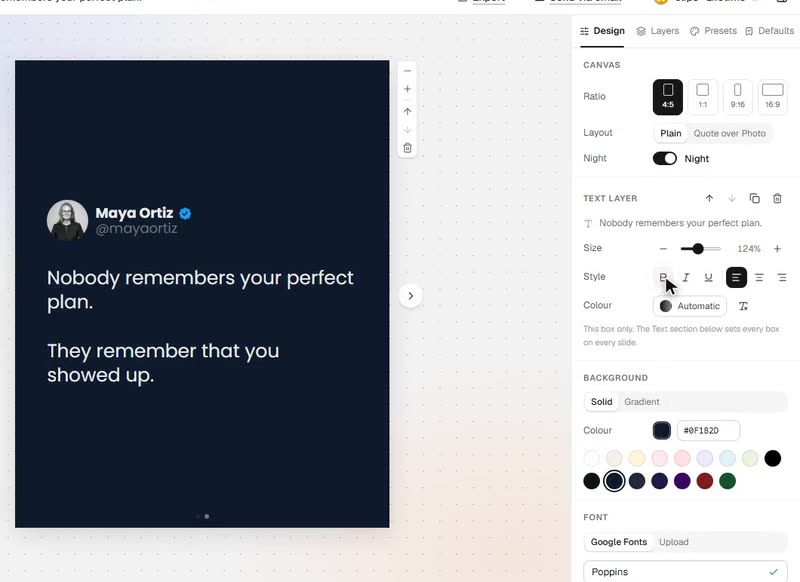
- You want every post to open in your look. Save presets and defaults once. Each new post starts with your name, photo, fonts and colours.
- You don't want to align anything. The layout is proportional. Text and photos sit where they should on every slide.
- You'd rather pay once. Lifetime access is one payment. Nothing renews and there's nothing to cancel.
Making the same carousel in both, step by step
The difference is how many steps sit between your words and the finished slides.
In Canva:
- Pick a template or start a blank design at the right size.
- Place a text box on each slide.
- Match fonts, sizes and spacing across every slide.
- Export.
In LightFit:
- Type or paste your words, one idea per slide.
- Set your look once (or let your saved preset do it).
- Export the PNGs.
People who make carousels in Canva describe the time it takes in their own words. One Reddit user put it at "around 45 minutes per carousel", with 20–30 minutes of that spent designing slides in Canva (r/socialmedia). Another wrote: "I used to spend hours on Canva too, tweaking fonts and spacing slide by slide" (r/LinkedInTips). Those are individual reports, not measurements. LightFit's point is simpler: there's nothing to line up.
Sizes and export
LightFit exports PNG slides, 1170px wide, in four sizes.
- 4:5 portrait. It's the size Instagram shows largest in the feed.
- 1:1, 9:16 and 16:9 for LinkedIn, X, Threads and stories.
- Up to 20 slides per carousel. Instagram allows up to 20 items in one carousel (Instagram Help Center).
Upload the PNGs as a carousel on Instagram, a multi-image post on LinkedIn, or images on X and Threads.
To be plain about it: LightFit doesn't export PDF. So it can't make a LinkedIn document carousel. If you need that, use a tool that exports PDF. For size details by platform, see how to turn an X thread into an Instagram carousel.
Price: subscription vs one payment
LightFit is $100 once for lifetime access. Nothing renews.
- What $100 lifetime includes: unlimited exports, up to 20 slides, every size, the full design panel with layers, presets and defaults, Night mode, Google fonts or your own font file, work saved across browsers, and send to email.
- "Lifetime" means for as long as LightFit Studios runs the service. The terms say exactly that.
- Tax: the price excludes any sales tax or VAT, which is calculated at checkout.
- Refund: full refund within 14 days (refunds policy).
- Payment: lifetime access is $100, paid once, and turns on right after payment.
Canva's paid plans are subscriptions. Check canva.com/pricing for its current prices.
For the full one-time vs subscription breakdown, see the carousel maker lifetime deal page.
One payment. Nothing renews. Full refund within 14 days.
About AI
LightFit draws your slides in the browser from your words and photos. No image model is involved, and there's no AI in the file. If you want AI help, it's there as an option: an in-app copilot and an AI apps option. Platforms make their own labelling decisions, so no tool can promise a post won't be labelled. Read more in why your carousel got an "AI info" label.
Other Canva alternatives for carousels
Most other Canva alternatives are AI generators or subscriptions. Some offer things LightFit doesn't, like PDF export. Prices below were read on each tool's own page, as of 17 Oct 2026. For generators that draft the slides, see the aiCarousels alternative. For the wider list, see the best carousel maker roundup.
| Tool | Approach | Starting price seen | Source (checked 17 Oct 2026) |
|---|---|---|---|
| Contentdrips | AI carousel maker; text or CSV to carousel; PDF or PNG export. | Starter $15/mo | contentdrips.com/pricing |
| PostNitro | Carousel maker, subscription. | Starter $15/mo | postnitro.ai/pricing |
| Caruva | One idea becomes a full carousel with an AI image on each slide. | Starter €9/mo | caruva.app/pricing |
| Postiv | LinkedIn suite with writing and scheduling. | Creator Light $27.30/mo, billed yearly | postiv.ai/pricing |
| Carousel Studio | One-time licence; you bring your own AI key. | $19 once for the first 100 customers, then $49 | carousel-studio.questera.ai |
- Contentdrips suits people who want AI to draft carousels and need PDF for LinkedIn.
- PostNitro suits people happy with a monthly plan for a dedicated carousel tool.
- Caruva suits people who want AI images on every slide.
- Postiv suits LinkedIn-first creators who also want writing and scheduling in one place.
- Carousel Studio suits people who already have an AI key and want a low one-time price.
- LightFit suits people who write their own words and want the design done quickly, for one payment.
FAQ
What's a simpler alternative to Canva for carousels?
A carousel-only tool. In LightFit Studios every post starts finished, in your name, and nothing needs aligning by hand. If you'd rather not write the words yourself, an AI carousel generator is the other route.
Is LightFit cheaper than Canva?
They're priced differently. LightFit is $100 once. Nothing renews. Full refund within 14 days. The price excludes tax. Canva's paid plans are subscriptions; check canva.com/pricing for current prices. The lifetime deal page shows the one-time vs subscription maths.
Can LightFit make LinkedIn PDF carousels?
No. LightFit exports PNG only. You can post the PNGs as a multi-image post on LinkedIn. For a PDF document carousel, use a tool that exports PDF.
Can I import a thread or post from a link?
No. You type or paste your own words, one idea per slide. LightFit is built for people who write.
Does LightFit use AI?
No image model is involved and there's no AI in the file: slides are drawn in your browser from your words and photos. Optional AI help is available in the app if you want it.
What do I get for $100?
Unlimited exports, up to 20 slides, four sizes (4:5, 1:1, 9:16 and 16:9), the full design panel with layers, presets and defaults, Night mode, Google fonts or your own font file, work saved across browsers, and send to email. One payment, and nothing renews.
Which sizes and formats does it export?
PNG only, 1170px wide, in 4:5, 1:1, 9:16 and 16:9, up to 20 slides. No PDF.
What happens when I buy lifetime access?
Lifetime access is $100, paid once, and turns on right after payment. Nothing renews, and there's a full refund within 14 days.
Should I switch from Canva?
Yes, if you mostly make text-first carousels and write your own words. Stay on Canva if you need general design, PDF carousels or team brand kits.
Your words, on finished slides. Pay once.
One payment. Nothing renews. Full refund within 14 days.